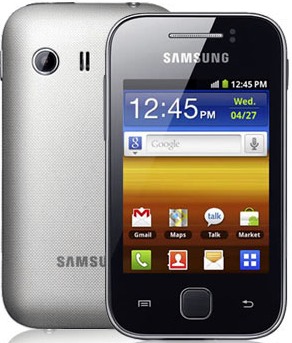
How to unlock Samsung Galaxy Y for Free

The Samsung Galaxy Y is a Smartphone that works with 832 MHz processor and with an OS of Android Platform 2.3 Gingerbread and it has a 3.0 QVGA TFT Display with 2MP Camera + Video Recording that supports the following audio files: MP3, OGG, AAC, ACC+, eACC+, WMA, MPEG 4: H.263.

Why unlock your phone?

  1. If you are a traveller, you can just buy local SIM cards in order to save a lot amount of money from International Roaming Fees.
  2. Free from any restrictions to any service provider worldwide.
  3. Reselling value of the phone would increase dramatically.
  4. The phone is permanently unlocked even after updates.
  5. No Software and Cables.
  6. No Technical Experience needed Easy and effortless instruction.
  7. It is LEGAL!

Unlocking Samsung Galaxy Y using a remote unlock code is available at Freeunlocks

Unlocking this phone requires an unlock code that is remotely sent to your email. Get your Free unlock code fast and easy at FreeUnlocks and experience the new world waiting for you once you have unlock your Samsung Galaxy Y phone. In order for you to unlock your phone you will need your IMEI # (by dialling *#06# or by looking under the battery), Brand/Model of the Phone, Country and Service Provider that your phone is currently locked to.

After you have located your IMEI #, click here and it will direct you to our website on how to unlock your Samsung Galaxy Y for Free!

On our webpage, you will be given a drop-down menu with options where you can choose which best corresponds to the Tool that you require.

GET IT FREE – Choose the best-corresponding option from the drop-down below, then click “Unlock Now”


All we need is your phone’s IMEI number, its model number, and the network to which it is currently locked.

After clicking the right option, you will be given choices of TrialPay offers- Before receiving the unlock code; you will have an option to complete one of the offers from TrialPay’s Partners.

ALL Unlock codes are available via PayPal or Credit Card through TrialPay secure checkout.

After purchasing the unlock code you will be receiving an email from us, mostly instant, with your IMEI #, Unlock Code, and How to unlock your phone reference.

How to enter the unlock code after I have purchased it?

If you have ordered the unlock code from Freeunlocks, your code will look something like this: “Here is your unlock code: NCK: 12345678 MCK (unfreeze): 12345678 SCK: 12345678 SPCK: 12345678”

  1. Turn on the power of your Samsung Galaxy Y with a NON ACCEPTED SIM card.
  2. If the phone asks, enter your P.I.N. code
  3. Enter the unlock code (NCK)
  4. The phone is now unlocked!

If your Samsung will not ask for the unlock code, you should:

  1. Turn on the power of your Samsung Galaxy Y with a NON ACCEPTED SIM card.
  2. Compose: #7465625*638*Unlock code*# ——– or———-*#7465625*638*Unlock code*#——–or——–#0111*Unlock code#
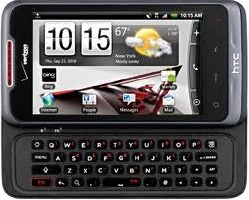
How to unlock HTC Merge with Free unlock code

HTC Merge is an Android Smartphone sports a slide-out text keyboard, 3G Roaming, and a 5 mega pixel with an HD video for Hi Definition quality and smooth videos.

This device is a Wi-Fi hot spot itself as it can share up to eight Wi-Fi enabled devices. It has an 800 MHz Processor and an Android 2.2 operating system plus an HTC Sense to maximize the pleasure in using the phone.

Why unlock your HTC Merge at FreeUnlocks?

Travelling a lot lately? And you need to bring your mobile phone with you but you’re scared of all those international roaming fees? Fear not because Freeunlocks will come to your rescue!

What to do if I decide to unlock my phone?

You won’t have to be a techie in order to unlock your phone, you just have to know and locate your IMEI #– to locate your IMEI #, just dial *#06# or by just looking under the battery.

Unlock your HTC Merge for free using a remote unlock code, remote meaning NO SOFTWARES and NO CABLES, all you have to do is follow the reference on how to unlock it together with the unlock code that we have sent you.

You won’t need a technician in order to unlock your HTC Merge phone, you can unlock it yourself! Click here and it will direct you to the webpage of our website on how to unlock you HTC phone.

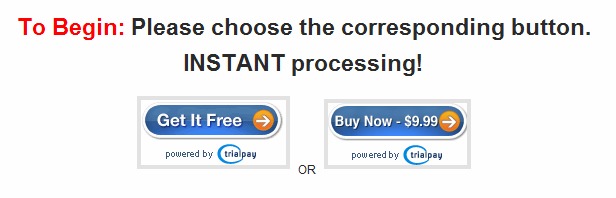
On our HTC webpage, you will be given 2 choices, a “Get It Free” or a “Buy Now” option.

If you choose “Get It Free” this is a process to where you will have the option to complete a free trial offer from one of TrialPay Partners before you receive your unlock code. TrialPay is a sponsor that is paying your unlock code from us. If you choose the “Buy Now” option, this is a process in which to purchase the unlock code directly through TrialPay’s secure check out using PayPal or Credit Card.

After checking out using TrialPay secure check out system, you will be receiving an email containing your order # and an activation number for you to process your unlock code manually. After processing your unlock code using Unlock on Order system, you will be receiving another email with the unlock code and a reference on how to unlock it.

How to unlock your HTC Merge using FreeUnlocks unlock code

  1. Turn the power on from your HTC Merge with the NON ACCEPTED SIM card.
  2. If asked, enter the P.I.N. code of your SIM card.
  3. Enter the 8 digit unlock code when prompted!

Your HTC Merge is now unlocked, and may automatically reboot!

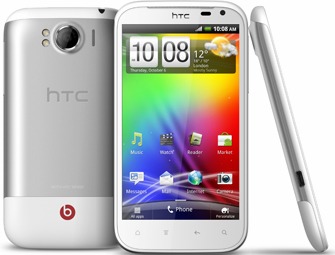
How to unlock your HTC Sensation XL

HTC Sensation is a Smartphone that satisfies your lifestyle of a very slick, flashy and incomparable music sensation that you have longed for. Experience the natural high of Android operated mobile experience while hearing the dynamics, clarity and the bass of what artists have been hearing.

Why unlock your HTC Sensation?

  1. If you are a traveller, you can just buy local SIM cards in order to save a lot amount of money from International Roaming Fees.
  2. Free from any restrictions to any service provider worldwide.
  3. Reselling value of the phone would increase dramatically.
  4. The phone is permanently unlocked even after updates.
  5. No Software and Cables.
  6. No Technical Experience needed Easy and effortless instruction.
  7. It is LEGAL!

Unlocking HTC Sensation XL is now available for unlocking at FreeUnlocks.

Unlock your HTC Sensation XL for free using a remote unlock code, remote meaning NO SOFTWARES and NO CABLES, all you have to do is follow the reference on how to unlock it together with the unlock code that we have sent you.

You won’t need a technician in order to unlock your HTC Sensation phone, you can unlock it yourself!

Click here and it will direct you to the webpage of our website on how to unlock you HTC phone.

On our HTC webpage, you will be given 2 choices, a “Get It Free” or a “Buy Now” option.

“Get It Free” is a process to where you will have the option to complete a free trial offer from one of TrialPay Partners before you receive your unlock code. TrialPay is a sponsor that is paying your unlock code from us. “Buy Now” is a process in which to purchase the unlock code directly through TrialPay’s secure check out using PayPal or Credit Card.

After checking out using TrialPay secure check out system, you will be receiving an email containing your order # and an activation number for you to process your unlock code manually. After processing your unlock code using Unlock On Order system, you will be receiving another email with the unlock code and a reference on how to unlock it.

How to unlock your HTC Sensation using our unlock code.

Unlock your HTC Sensation using FreeUnlocks unlock code by following this easy instructions.

  1. Turn the power on of your phone without the SIM card.
  2. Your Mobile phone will ask for the unlock code.  *If you phone is not asking for the unlock code, kindly please reboot your Mobile Phone with the NON ACCEPTED SIM card.
  3. Enter your 8 digit unlock code that you have received from us and press “Enter.”

Your HTC Sensation XL will automatically reboot (which is normal) and your HTC phone is now unlocked!

Unlocking HTC Wildfire S for free

With the slogan “Bring your friends to you,” the slogan itself describes it all! This smart phone lets you surf the web with multi-window browsing system and it is equipped with a 5MP camera that lets you point, shoot and tag them or post it to any social media website.

How does unlocking my HTC Wildfire help me?

Unlocking your HTC will help you to be free form all those international roaming fees that are quite expensive because when your phone is unlocked, you can use all the SIM cards in the world that would be useful and convenient for you to use.

What will I do to unlock it?

This is where FreeUnlocks comes to play, our website FreeUnlocks gives you a convenient way to choose an option on how to get your unlock code. When you decide to unlock your phone, you won’t need an unlocking experience since we do include a reference for every emailed unlock code that we sent out.

Click here and it will direct you to the webpage of our website on how to unlock you HTC phone. Or, simply click “Unlock Now” after choosing your preferred model at the dropdown menu below.

On our HTC webpage, you will be given 2 choices, a “Get It Free” or a “Buy Now” option.

“Get It Free” is a process to where you will have the option to complete a free trial offer from one of TrialPay Partners before you receive your unlock code. TrialPay is a sponsor that is paying your unlock code from us. “Buy Now” is a process in which to purchase the unlock code directly through TrialPay’s secure check out using PayPal or Credit Card.

After checking out using TrialPay secure check out system, you will be receiving an email containing your order # and an activation number for you to process your unlock code manually. After processing your unlock code using Unlock On Order system, you will be receiving another email with the unlock code and a reference on how to unlock it.

How to unlock HTC wildfire using my unlock code.

Here is easy step by step information on how to unlock your HTC Wildfire and you may not need a technical experience for this one!

  1. Turn on the power of your HTC Wildfire phone with the unaccepted SIM card.
  2. Enter you 8 digit unlock code that you got from our email.
  3. Your HTC Wildfire is now unlocked and will reboot automatically!

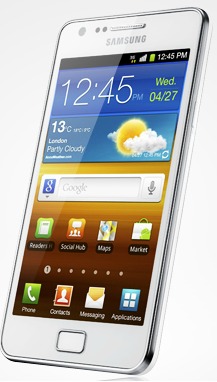
How to unlock a Samsung Galaxy S2 for FREE

The new Samsung Galaxy S2 works with 1.2GHz Processor and with an OS of Android Platform 2.3 also has a 4.3” WVGA SUPER AMOLED Plus Touch screen display. This Smartphone with a dimension of 125.3×66.1×8.49mm is a slick, fancy and super feather that is equipped with an 8 Mega Pixel AF with LED Flash + 2 Megapixel Front cameras.

Unlocking Samsung Galaxy S2 with a remote unlock code is now available at FreeUnlocks.

Unlocking this phone requires an unlock code that is remotely sent to your email. Get your Free unlock code fast and easy and experience the new world waiting for you once you have unlock your Samsung Galaxy S2 phone. In order for you to unlock your phone you will need your IMEI # (by dialling *#06# or by looking under the battery), Brand/Model of the Phone, Country and Service Provider that your phone is currently locked to.

After you have located your IMEI #, click here and it will direct you to our website on how to unlock your Samsung Galaxy S2 for Free!

On our webpage, you will be given a drop-down menu with options where you can choose which best corresponds to the Tool that you require.

GET IT FREE – Choose the best-corresponding option from the drop-down below, then click “Unlock Now”

All we need is your phone’s IMEI number, its model number, and the network to which it is currently locked.

After clicking the right option, you will be given choices of TrialPay offers- Before receiving the unlock code; you will have an option to complete one of the offers from TrialPay’s Partners.

ALL Unlock codes are available via PayPal or Credit Card through TrialPay secure checkout.

After purchasing the unlock code you will be receiving an email from us, mostly instant, with your IMEI #, Unlock Code, and How to unlock instructions.

Why unlock your phone?

  1. If you are a traveller, you can just buy local SIM cards in order to save a lot amount of money from International Roaming Fees.
  2. Free from any restrictions to any service provider worldwide.
  3. Reselling value of the phone would increase dramatically.
  4. The phone is permanently unlocked even after updates.
  5. No Software and Cables.
  6. No Technical Experience needed Easy and effortless instruction.
  7. It is LEGAL!

How to unlock your Samsung Galaxy S2?

  1. Insert the unaccepted SIM card and then turn the power ON.
  2. You will be asked for an unlock code or password.
  3. Enter your unlock code.
  4. Your Samsung Galaxy S2 in now unlocked!

Otherwise, if the phone is displaying “Insert Correct SIM card” you may want to use this instruction:

  1. Insert the unaccepted SIM card and turn the power ON.
  2. Dial or Type #7465625*638*CODE#
  3. Your Samsung Galaxy S2 is now unlocked!