How to unlock Samsung Infuse 4G for free

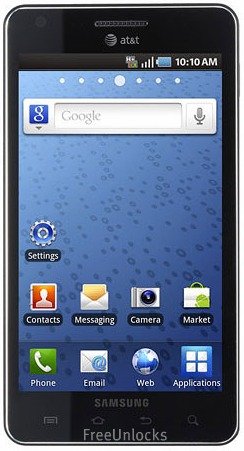
The Samsung Infuse 4G is the thinnest amongst the Samsung’s smart phones out in the market, with just 8.99 mm so it is very easy to hide or slip into pockets. This super smart phone is operated by a 1.2 GHz High Speed Processor runs applications and websites without delays. Imagine combining that super fast processor speed with AT&T’s fastest mobile broadband network is simply AMAZING! And, when combined with enhanced backhaul equals super fast 4G data connection speed with HSPA+ and also with also the help of Android 2.2 Froyo Operating System.

Unlocking Samsung Infuse 4G with a remote unlock code is now available at FreeUnlocks.

Unlocking this phone requires an unlock code that is remotely sent to your email. Get your Free unlock code fast and easy and experience the new world waiting for you once you have unlock your Samsung Infuse 4G phone. In order for you to unlock your phone you will need your IMEI # (by dialling *#06# or by looking under the battery), Brand/Model of the Phone, Country and Service Provider that your phone is currently locked to.

After you have located your IMEI #, click here and it will direct you to our website on how to unlock your Samsung Infuse 4G for Free!

On our webpage, you will be given a drop-down menu with options where you can choose which best corresponds to the Tool that you require.

GET IT FREE – Choose the best-corresponding option from the drop-down below, then click “Unlock Now”

All we need is your phone’s IMEI number, its model number, and the network to which it is currently locked.

After clicking the right option, you will be given choices of TrialPay offers- Before receiving the unlock code; you will have an option to complete one of the offers from TrialPay’s Partners.

ALL Unlock codes are available via PayPal or Credit Card through TrialPay secure checkout.

After purchasing the unlock code you will be receiving an email from us, mostly instant, with your IMEI #, Unlock Code, and How to unlock instructions.

Is it safe to unlock my Samsung Infuse 4G using IMEI unlocking code?

Our unlocking method is absolutely safe and secure. The phone is not subjected to any modification of software—meaning if you unlocked your Samsung Infuse 4G, it will remain unlocked after any software updates.

Also, we are using the same technique as manufacturers do when unlocking so it is very safe.

Will unlocking my Samsung Infuse 4G voids my warranty?

Unlocking your Samsung infuse 4G won’t affect your warranty because our technique is the same as manufacturers would do it. All new devices are by default unlocked. Manufacturers only locked the phones by carriers or by service provider’s demand.

Why unlock your Samsung Infuse 4G?

  1. If you are a traveller, you can just buy local SIM cards in order to save a lot amount of money from International Roaming Fees.
  2. Free from any restrictions to any service provider worldwide.
  3. Reselling value of the phone would increase dramatically.
  4. The phone is permanently unlocked even after updates.
  5. No Software and Cables.
  6. No Technical Experience needed Easy and effortless instruction.
  7. It is LEGAL!

How to enter unlock code to your Samsung Infuse 4G using FreeUnlocks unlock code.

If you have ordered the unlock code from FreeUnlocks, your code will look something like this: “Here is your unlock code: NCK: 12345678 MCK (unfreeze): 12345678 SCK: 12345678 SPCK: 12345678”

  1. Turn on the power of your Samsung Infuse 4G with a NON ACCEPTED SIM card.
  2. If the phone asks, enter your P.I.N. code
  3. Enter the unlock code (NCK)
  4. The phone is now unlocked!

Turn on the power of your Samsung Infuse 4G with a NON ACCEPTED SIM card. If your Samsung will not ask for the unlock code, you should:

Compose: #7465625*638*Unlock code*# ——– or———-*#7465625*638*Unlock code*#——–or——–#0111*Unlock code#
How to unlock Samsung Wave 525 for free

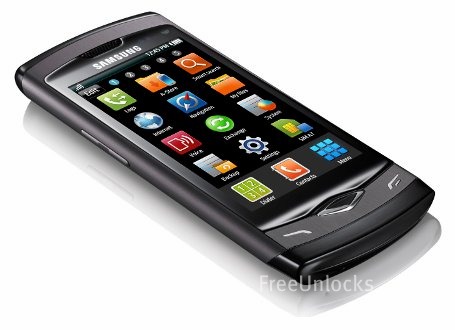
The Samsung Wave 525 is a Bada OS smartphone that offers breakthrough connectivity across popular social networking sites with its social hub technology.  With a touch, users can post, tweet or send a message on Facebook, Twitter and so much more. The device also offers constant connection with lightning-fast Wi-Fi support. Geo-tagging lets you tag photos by location so that you can easily sort images based on whether they are from you summer vacation or a business trip. This 2.5G GPRS/EDGE quad band phone has a 3.2-inch display with 3.0-megapixel camera that is also capable of video and recording.

Unlocking Samsung Wave 525 with a remote unlock code is now available at FreeUnlocks.

Unlocking this phone requires an unlock code that is remotely sent to your email. Get your Free unlock code fast and easy and experience the new world waiting for you once you have unlock your Samsung Wave 525 phone. In order for you to unlock your phone you will need your IMEI # (by dialling *#06# or by looking under the battery), Brand/Model of the Phone, Country and Service Provider that your phone is currently locked to.

After you have located your IMEI #, click here and it will direct you to our website on how to unlock your Samsung Wave 525 for Free!

On our webpage, you will be given a drop-down menu with options where you can choose which best corresponds to the Tool that you require.


All we need is your phone’s IMEI number, its model number, and the network to which it is currently locked.

After clicking the right option, you will be given choices of TrialPay offers- Before receiving the unlock code; you will have an option to complete one of the offers from TrialPay’s Partners.

ALL Unlock codes are available via PayPal or Credit Card through TrialPay secure checkout.

After purchasing the unlock code you will be receiving an email from us, mostly instant, with your IMEI #, Unlock Code, and How to unlock instructions.

 Is it safe to unlock my Samsung Wave 525 using IMEI unlocking code?

Our unlocking method is absolutely safe and secure. The phone is not subjected to any modification of software—meaning if you unlocked your Samsung Wave 525, it will remain unlocked after any software updates.

Also, we are using the same technique as manufacturers do when unlocking so it is very safe.

Will unlocking my Samsung Wave 525 voids my warranty?

Unlocking your Samsung Wave 525   won’t affect your warranty because our technique is the same as manufacturers would do it. All new devices are by default unlocked. Manufacturers only locked the phones by carriers or by service provider’s demand.

Why unlock your Samsung Wave 525?

  1. If you are a traveller, you can just buy local SIM cards in order to save a lot amount of money from International Roaming Fees.
  2. Free from any restrictions to any service provider worldwide.
  3. Reselling value of the phone would increase dramatically.
  4. The phone is permanently unlocked even after updates.
  5. No Software and Cables.
  6. No Technical Experience needed Easy and effortless instruction.
  7. It is LEGAL!

How to enter unlock code to your Samsung Wave 525 using FreeUnlocks unlock code.

If you have ordered the unlock code from FreeUnlocks, your code will look something like this: “Here is your unlock code: NCK: 12345678 MCK (unfreeze): 12345678 SCK: 12345678 SPCK: 12345678”

  1. Turn on the power of your Samsung Wave 525 with a NON ACCEPTED SIM card.
  2. If the phone asks, enter your P.I.N. code
  3. Enter the unlock code (NCK)
  4. The phone is now unlocked!

Turn on the power of your Samsung Wave 525 with a NON ACCEPTED SIM card. If your Samsung will not ask for the unlock code, you should:

Compose: #7465625*638*Unlock code*# ——– or———-*#7465625*638*Unlock code*#——–or——–#0111*Unlock code#
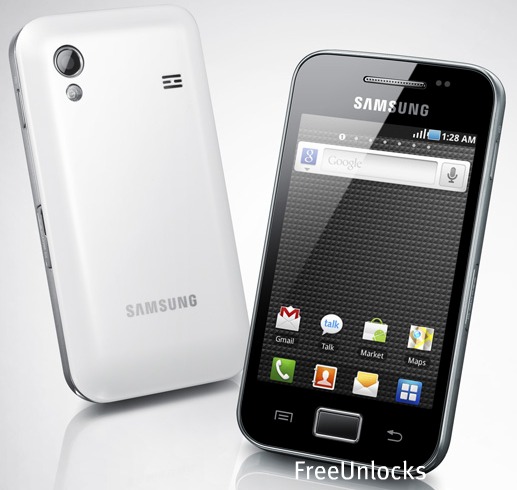
How to unlock Samsung Galaxy Fit for free

The Samsung Galaxy Fit is for the users who want a device that means all the challenges of a professional career and a busy social life. On a 3.3-inch QVGA Display, the Fit keeps you not only on the job from anywhere with office viewer, but also on the run for fun from photos taken with 5-megapixel camera to music. It is functional and fun with a user experience that is optimized for sharing and smooth web browsing on the go with 600 MHz processor. No Complications and no conflicts, the Samsung Galaxy Fit can help you lead a double life with professional design that doesn’t compromise on enhanced capabilities.

Unlocking Galaxy Fit with a remote unlock code is now available at FreeUnlocks.

Unlocking this phone requires an unlock code that is remotely sent to your email. Get your Free unlock code fast and easy and experience the new world waiting for you once you have unlock your Samsung Galaxy Fit phone. In order for you to unlock your phone you will need your IMEI # (by dialling *#06# or by looking under the battery), Brand/Model of the Phone, Country and Service Provider that your phone is currently locked to.

After you have located your IMEI #, click here and it will direct you to our website on how to unlock your Samsung Galaxy Fit for Free!

On our webpage, you will be given a drop-down menu with options where you can choose which best corresponds to the Tool that you require.


After clicking the right option, you will be given choices of TrialPay offers- Before receiving the unlock code; you will have an option to complete one of the offers from TrialPay’s Partners.

ALL Unlock codes are available via PayPal or Credit Card through TrialPay secure checkout.

After purchasing the unlock code you will be receiving an email from us, mostly instant, with your IMEI #, Unlock Code, and How to unlock instructions.

 Is it safe to unlock my Samsung Galaxy Fit using IMEI unlocking code?

Our unlocking method is absolutely safe and secure. The phone is not subjected to any modification of software—meaning if you unlocked your Samsung Galaxy Fit, it will remain unlocked after any software updates.

Also, we are using the same technique as manufacturers do when unlocking so it is very safe.

Will unlocking my Samsung Galaxy Fit voids my warranty?

Unlocking your Samsung Galaxy Fit  won’t affect your warranty because our technique is the same as manufacturers would do it. All new devices are by default unlocked. Manufacturers only locked the phones by carriers or by service provider’s demand.

Why unlock your Samsung Galaxy Fit?

  1. If you are a traveller, you can just buy local SIM cards in order to save a lot amount of money from International Roaming Fees.
  2. Free from any restrictions to any service provider worldwide.
  3. Reselling value of the phone would increase dramatically.
  4. The phone is permanently unlocked even after updates.
  5. No Software and Cables.
  6. No Technical Experience needed Easy and effortless instruction.
  7. It is LEGAL!

How to enter unlock code to your Samsung Galaxy Fit using FreeUnlocks unlock code.

If you have ordered the unlock code from FreeUnlocks, your code will look something like this: “Here is your unlock code: NCK: 12345678 MCK (unfreeze): 12345678 SCK: 12345678 SPCK: 12345678”

  1. Turn on the power of your Samsung Galaxy Fit with a NON ACCEPTED SIM card.
  2. If the phone asks, enter your P.I.N. code
  3. Enter the unlock code (NCK)
  4. The phone is now unlocked!

Turn on the power of your Samsung Galaxy Fit with a NON ACCEPTED SIM card. If your Samsung will not ask for the unlock code, you should:

Compose: #7465625*638*Unlock code*# ——– or———-*#7465625*638*Unlock code*#——–or——–#0111*Unlock code#
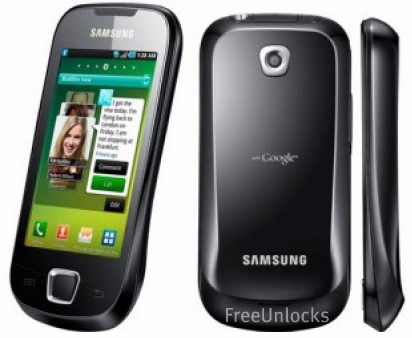
How to unlock Samsung Galaxy Ace for free

The Samsung Galaxy Ace is designed for trendy and sociable young professionals. With its sophisticated design, the Samsung Galaxy Ace has been created to be simple yet elegant. The Ace offers a premium experience with a 3.5-inch HVGA display on a compact and comfortable handset.  However, this stylish smartphone does not compromise on capabilities, with an 800MHz processor and an Android OS 2.2 Froyo, Google voice search and ThinkFree document viewer.

Unlocking Galaxy Ace with a remote unlock code is now available at FreeUnlocks.

Unlocking this phone requires an unlock code that is remotely sent to your email. Get your Free unlock code fast and easy and experience the new world waiting for you once you have unlock your Samsung Galaxy Ace phone. In order for you to unlock your phone you will need your IMEI # (by dialling *#06# or by looking under the battery), Brand/Model of the Phone, Country and Service Provider that your phone is currently locked to.

After you have located your IMEI #, click here and it will direct you to our website on how to unlock your Samsung Galaxy Ace for Free!

On our webpage, you will be given a drop-down menu with options where you can choose which best corresponds to the Tool that you require.

GET IT FREE – Choose the best-corresponding option from the drop-down below, then click “Unlock Now”

All we need is your phone’s IMEI number, its model number, and the network to which it is currently locked.

After clicking the right option, you will be given choices of TrialPay offers- Before receiving the unlock code; you will have an option to complete one of the offers from TrialPay’s Partners.

ALL Unlock codes are available via PayPal or Credit Card through TrialPay secure checkout.

After purchasing the unlock code you will be receiving an email from us, mostly instant, with your IMEI #, Unlock Code, and How to unlock instructions.

 Is it safe to unlock my Samsung Galaxy Ace using IMEI unlocking code?

Our unlocking method is absolutely safe and secure. The phone is not subjected to any modification of software—meaning if you unlocked your Samsung Galaxy Acei, it will remain unlocked after any software updates.

Also, we are using the same technique as manufacturers do when unlocking so it is very safe.

Will unlocking my Samsung Galaxy Ace voids my warranty?

Unlocking your Samsung Galaxy Ace  won’t affect your warranty because our technique is the same as manufacturers would do it. All new devices are by default unlocked. Manufacturers only locked the phones by carriers or by service provider’s demand.

Why unlock your Samsung Galaxy Ace?

  1. If you are a traveller, you can just buy local SIM cards in order to save a lot amount of money from International Roaming Fees.
  2. Free from any restrictions to any service provider worldwide.
  3. Reselling value of the phone would increase dramatically.
  4. The phone is permanently unlocked even after updates.
  5. No Software and Cables.
  6. No Technical Experience needed Easy and effortless instruction.
  7. It is LEGAL!

How to enter unlock code to your Samsung Galaxy Ace using FreeUnlocks unlock code.

If you have ordered the unlock code from FreeUnlocks, your code will look something like this: “Here is your unlock code: NCK: 12345678 MCK (unfreeze): 12345678 SCK: 12345678 SPCK: 12345678”

  1. Turn on the power of your Samsung Galaxy Ace with a NON ACCEPTED SIM card.
  2. If the phone asks, enter your P.I.N. code
  3. Enter the unlock code (NCK)
  4. The phone is now unlocked!

Turn on the power of your Samsung Galaxy Ace with a NON ACCEPTED SIM card. If your Samsung will not ask for the unlock code, you should:

Compose: #7465625*638*Unlock code*# ——– or———-*#7465625*638*Unlock code*#——–or——–#0111*Unlock code#

How to unlock your Samsung Galaxy Mini for free

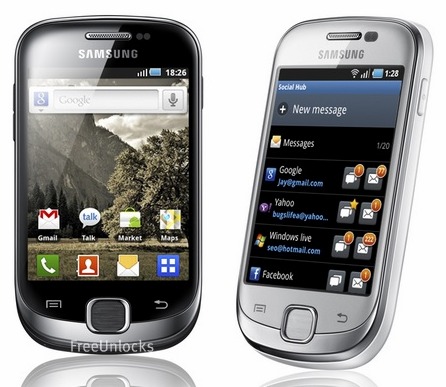
An ideal first smartphone for trendy and sociable youngsters, the Samsung Galaxy mini is a breath of fresh air for those that want a smart device that is fun and functional. It is characterized by a flashy colour stripe that run on its side, this mobile keeps you connected to everything that matters in your life. With a 3.14-inch QVGA display, the Samsung Galaxy mini embodies great productivity and performance in a compact design that is full of personality. The Galaxy mini is the perfect gift for smartphone rookies; I also offer Google voice actions and 600MHz processor. The Samsung Galaxy mini is a fun and funky way to embrace the smartphone generation.

Unlocking Galaxy Mini with a remote unlock code is now available at FreeUnlocks.

Unlocking this phone requires an unlock code that is remotely sent to your email. Get your Free unlock code fast and easy and experience the new world waiting for you once you have unlock your Samsung Galaxy Mini phone. In order for you to unlock your phone you will need your IMEI # (by dialling *#06# or by looking under the battery), Brand/Model of the Phone, Country and Service Provider that your phone is currently locked to.

After you have located your IMEI #, click here and it will direct you to our website on how to unlock your Samsung Galaxy Mini for Free!

On our webpage, you will be given a drop-down menu with options where you can choose which best corresponds to the Tool that you require.


All we need is your phone’s IMEI number, its model number, and the network to which it is currently locked.

After clicking the right option, you will be given choices of TrialPay offers- Before receiving the unlock code; you will have an option to complete one of the offers from TrialPay’s Partners.

ALL Unlock codes are available via PayPal or Credit Card through TrialPay secure checkout.

After purchasing the unlock code you will be receiving an email from us, mostly instant, with your IMEI #, Unlock Code, and How to unlock instructions.

 Is it safe to unlock my Samsung Galaxy Mini using IMEI unlocking code?

Our unlocking method is absolutely safe and secure. The phone is not subjected to any modification of software—meaning if you unlocked your Samsung Galaxy Mini, it will remain unlocked after any software updates.

Also, we are using the same technique as manufacturers do when unlocking so it is very safe.

Will unlocking my Samsung Galaxy Mini voids my warranty?

Unlocking your Samsung Galaxy Mini won’t affect your warranty because our technique is the same as manufacturers would do it. All new devices are by default unlocked. Manufacturers only locked the phones by carriers or by service provider’s demand.

 Why unlock your Samsung Galaxy Mini?

  1. If you are a traveller, you can just buy local SIM cards in order to save a lot amount of money from International Roaming Fees.
  2. Free from any restrictions to any service provider worldwide.
  3. Reselling value of the phone would increase dramatically.
  4. The phone is permanently unlocked even after updates.
  5. No Software and Cables.
  6. No Technical Experience needed Easy and effortless instruction.
  7. It is LEGAL!

How to enter unlock code to your Samsung Galaxy Mini using FreeUnlocks unlock code.

If you have ordered the unlock code from FreeUnlocks, your code will look something like this: “Here is your unlock code: NCK: 12345678 MCK (unfreeze): 12345678 SCK: 12345678 SPCK: 12345678”

  1. Turn on the power of your Samsung Galaxy Mini with a NON ACCEPTED SIM card.
  2. If the phone asks, enter your P.I.N. code
  3. Enter the unlock code (NCK)
  4. The phone is now unlocked!

Turn on the power of your Samsung Galaxy Mini with a NON ACCEPTED SIM card. If your Samsung will not ask for the unlock code, you should:

Compose: #7465625*638*Unlock code*# ——– or———-*#7465625*638*Unlock code*#——–or——–#0111*Unlock code#